This Reddit post made the rounds a while back. The author parsed 30 days of Nginx Proxy Manager logs and found 1.16 million attack requests out of 5.4 million total. WordPress scans, webshell probes, secrets hunting, Log4Shell attempts – the full catalog of internet background noise. It was a good read and made me wonder what my own logs looked like.
My setup is different from theirs. I run OPNsense as my edge firewall with strict VLAN segmentation. The homelab lives on a dedicated VLAN behind the firewall. NPM routes traffic to about 26 services. Remote access is through Tailscale – no ports forwarded from the WAN.
I wrote a parser, pointed it at the NPM access logs, and let it process 22 million lines.
The headline number
Zero.
Zero external requests reached my reverse proxy. Every single one of the 22 million requests was from an internal IP address on my LAN. My daily driver machines, my phone, my wife’s laptop – all hitting homelab services through NPM by domain name. The internet never touched it.
The fallback/catch-all host that the Reddit post relied on to catch half of their attack traffic? Empty. Not a single request. OPNsense drops unsolicited inbound traffic before it ever reaches the reverse proxy layer.
What a naive parser would have told you
This is the interesting part. If I had run the same simple pattern-matching parser from the Reddit post, it would have reported 454,053 “attacks” – 26% of total traffic. The top “attacker” would have been 192.168.10.102 with 382,915 requests. Scary stuff.
But that IP is my desktop computer. The Go HTTP client in Immich’s backend, the Python requests library in my automation scripts, the OPTIONS preflight checks from my browser – all of these look like scanners to a naive parser. Go-http-client is a perfectly normal User-Agent for microservice communication. On an internal network, it is not a scanner signature.
The real takeaway: if you run attack detection on NPM logs from a firewalled network, you must filter out internal IPs first. Otherwise you are just graphing your own API calls.
What actually works
The architecture that produces these numbers is not complicated:
Internet  -->  OPNsense (drops everything)  -->  NPM never sees it
LAN       -->  OPNsense (allows)             -->  NPM routes to services
Remote    -->  Tailscale (encrypted tunnel)  -->  NPM routes to services
Three things matter:
OPNsense at the edge. Stateful firewall, default-deny inbound. No port forwarding to NPM or any other service. If it did not originate from inside the network, it is dropped.
VLAN segregation. The homelab VLAN has no direct internet exposure. Even if a service had a vulnerability, it cannot be reached from the WAN because the firewall never lets the traffic through.
Tailscale for remote access. No open ports. No dynamic DNS. No public-facing attack surface. Remote access is a WireGuard tunnel to the Tailscale subnet router running on OPNsense.
The Reddit post’s advice in context
The original post recommended 444 rules, CrowdSec, and blocking PHP paths in NPM. Good advice if NPM is your only line of defense. But those are countermeasures for a setup that is already exposed. They handle the symptoms, not the cause.
If you have a proper firewall in front of NPM, the 444 rules do nothing – there is nothing to block. The fallback host never gets hit. The WordPress scans, the webshell probes, the .env file hunters – they never reach the proxy.
The right first step is not better NPM rules. It is a firewall that does not let the traffic through in the first place.
The visualization
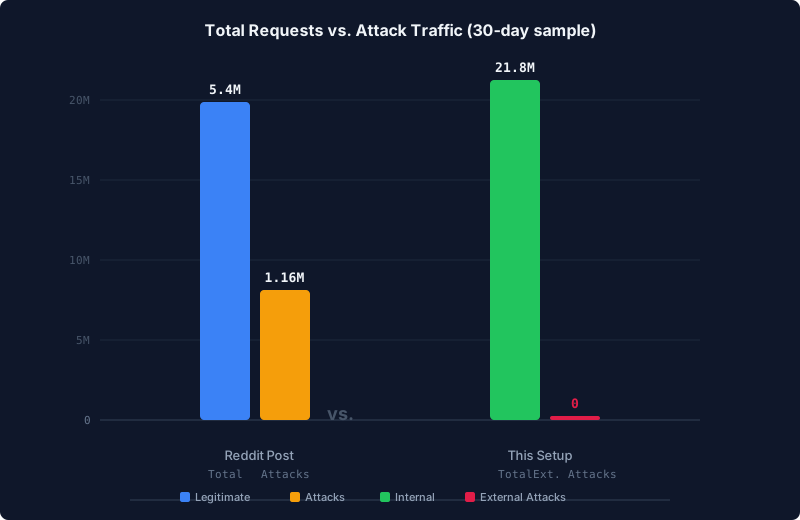
The chart above compares the two setups. The Reddit post saw 5.4 million requests with 1.16 million attacks. This setup handled 21.8 million requests with zero external attacks. The bar for external attacks is not small – it is zero.
What I learned from this exercise
The parser itself was the most useful outcome. It forced me to verify that my assumptions about the firewall were correct. It also caught a few things worth noting:
- 382,451 internal requests would have been flagged as attacks by a naive scanner. Internal Go HTTP clients and Python requests look like scanners if you do not filter by source IP.
- The NPM access logs are a good data source for verifying firewall behavior, but a poor data source for detecting attacks when the firewall is doing its job. All the interesting drops happen at OPNsense, not NPM.
- If you want to actually measure what the internet is throwing at you, you need to parse the firewall logs, not the reverse proxy logs. The proxy only sees what the firewall lets through.