Here’s a breakdown of everything running in my homelab: hardware, network, virtualisation, storage, and services.
The main reason I built all of this was to stop depending on big cloud providers and take back ownership of my own data. Too much of what I relied on day to day was sitting on someone else’s servers, subject to their pricing, their outages, and their terms. Having a fully functional lab that works even when the internet goes down is genuinely satisfying. There is something rewarding about knowing your photos, files, and media live on hardware you own and control. As a bonus it let me cut the cord on Google storage, iCloud, Netflix, and other streaming subscriptions without feeling like I was giving anything up.
I’ve been running this for a while now and it has grown into something I actually rely on every day. Everything sits in a corner of my bedroom. No rack, no server room, just a pile of machines that make the room run a couple of degrees warmer during the day.
Hardware
No rack. Four machines, a switch, and an access point. Each one has a dedicated job.
| Device | Role | CPU | RAM | Storage | OS |
|---|---|---|---|---|---|
| Custom Desktop | Daily Driver | AMD Ryzen 7 7800X3D (16c @ 5.05GHz) | 62 GB DDR4 | 2 TB SSD | Arch Linux (Omarchy) |
| Intel N150 Mini PC | Router / Firewall | Intel Twin Lake N150 | 12 GB | 512 GB SSD | OPNsense |
| Custom Tower | NAS | Intel Core i5-4670K (3.4GHz) | 8 GB | 45 TB RAID + 2x7 TB Mirror | TrueNAS |
| Dell OptiPlex Micro 7010 | Hypervisor | Intel i5-13500T (20c) | 32 GB DDR4 | 1 TB SSD | Proxmox VE |
| TP-Link SG108E | Managed Switch | ||||
| UniFi AP | Access Point |
The daily driver is overkill by any reasonable measure. The 7800X3D and RTX 5070 Ti are primarily for gaming and development, but the machine also pulls double duty on homelab tasks when needed. The Dell OptiPlex Micro is the quiet workhorse: tiny form factor, 20 threads from the i5-13500T’s hybrid core layout, and efficient enough to run 24/7 without guilt.
Network
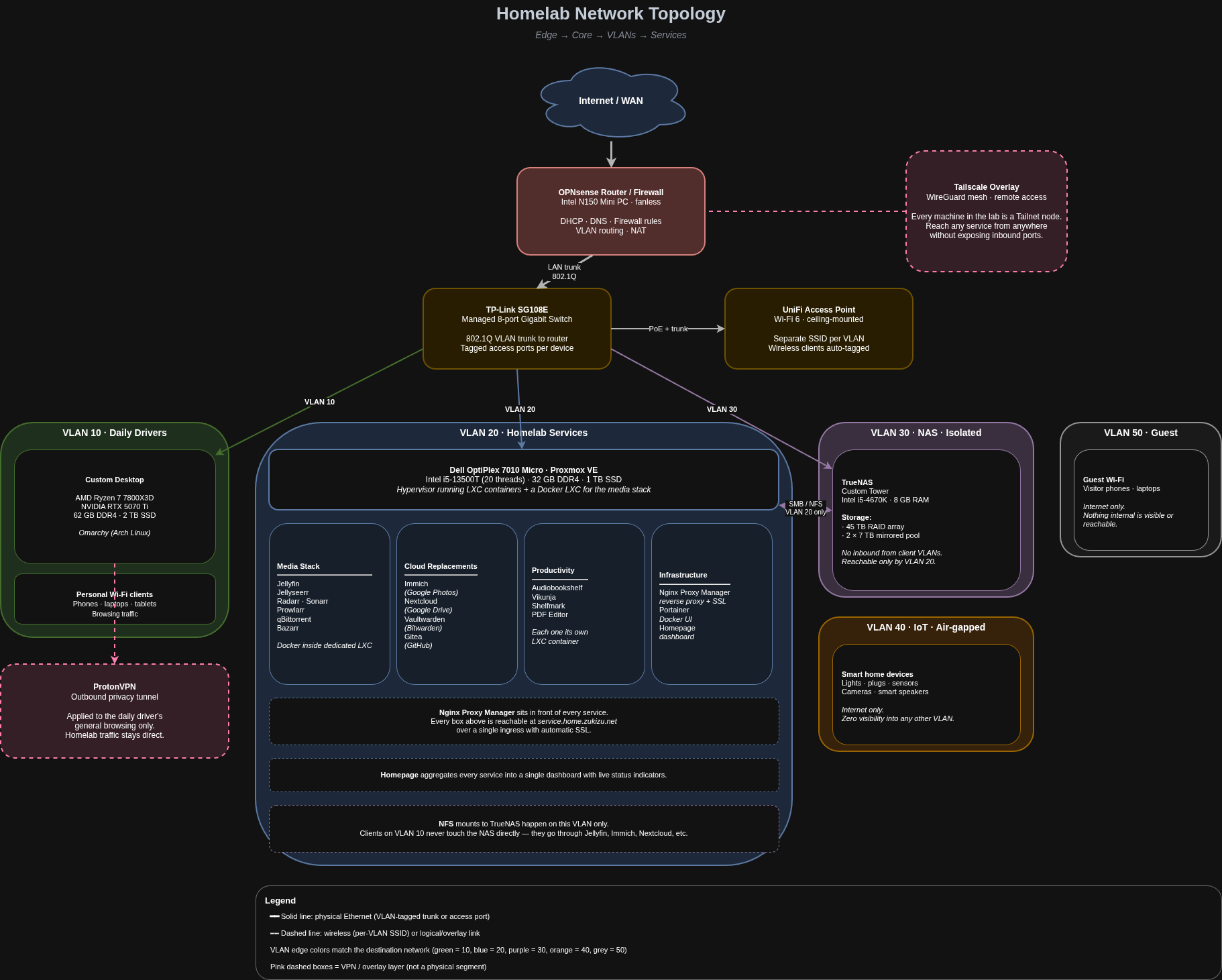
The network is the part I’ve spent the most time getting right. The goal was full segmentation. Devices that don’t need to talk to each other shouldn’t be able to, regardless of whether someone misconfigures something.
Router / Firewall
An Intel N150 Mini PC running OPNsense handles everything at the edge: DHCP, DNS, firewall rules, and VLAN routing. The N150 is fanless and draws very little power. It’s the right tool for a job that needs to be on and reliable around the clock.
Switch and Wi-Fi
All machines are wired through a TP-Link SG108E 8-port managed Gigabit switch. The UniFi Access Point broadcasts a separate SSID per VLAN, so wireless clients land on the correct network segment automatically without any manual configuration on the device side.
VLANs
Five VLANs, each with its own firewall policy:
| VLAN | Name | Purpose |
|---|---|---|
| 10 | Daily Drivers | Personal computers and main workstation |
| 20 | Homelab Services | VMs and self-hosted services on Proxmox |
| 30 | NAS | Storage array, isolated from direct client access |
| 40 | IoT | Smart home devices |
| 50 | Guest | Guest Wi-Fi |
The segmentation isn’t just cosmetic. VLAN 30 (NAS) has no direct inbound access from clients. Storage is only reachable via services running on VLAN 20. If something on a client machine gets compromised, it can’t browse or mount network shares directly. VLAN 40 is fully air-gapped from everything else on the network. Smart devices can reach the internet but have zero visibility into any other VLAN or host. VLAN 50 follows the same principle for guests: internet only, nothing internal is visible or reachable.
Remote Access
Tailscale handles remote access. Every machine in the lab is on a Tailnet, so I can reach any service from anywhere without opening ports or punching holes in the firewall.
Privacy
ProtonVPN is used for general internet traffic on the daily driver, keeping browsing off the ISP’s logs without routing all homelab traffic through an external tunnel unnecessarily.
Daily Driver PC
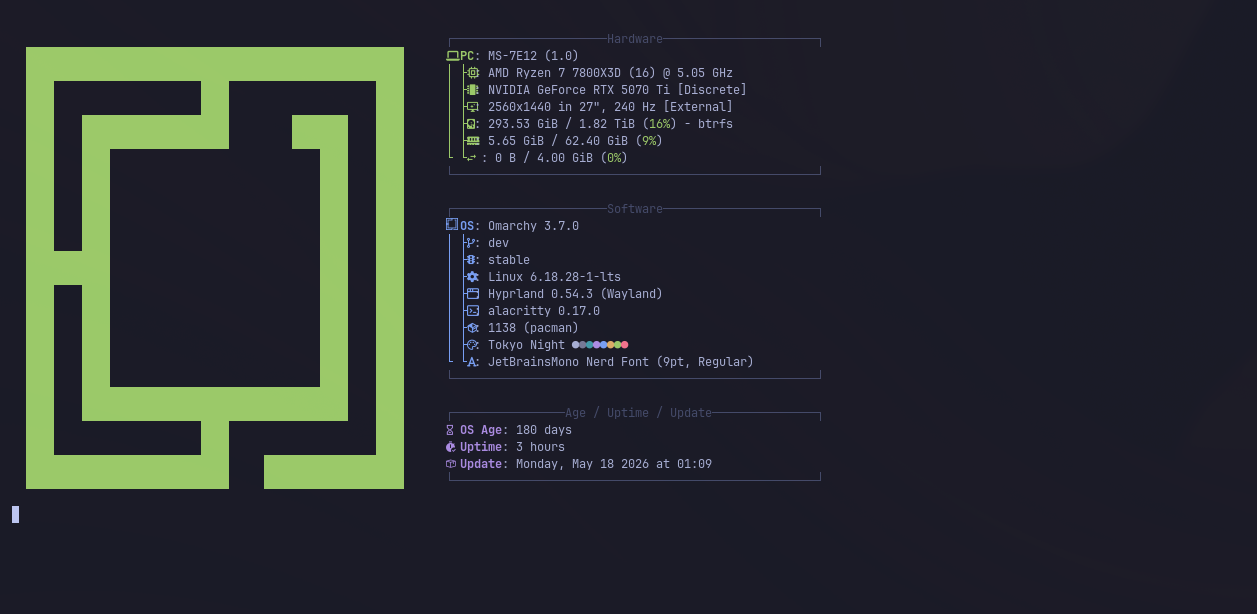
The daily driver is a custom build centered around the AMD Ryzen 7 7800X3D. It is primarily a gaming and development machine but it earns its place in the homelab too.
Specs:
- CPU: AMD Ryzen 7 7800X3D (16 threads at 5.05GHz)
- GPU: NVIDIA RTX 5070 Ti
- RAM: 62 GB DDR4
- Storage: 2 TB SSD
- OS: Omarchy
The 7800X3D is one of the better chips available for gaming thanks to its oversized L3 cache, and it handles development workloads without breaking a sweat. The RTX 5070 Ti takes care of anything GPU-intensive. Running Omarchy keeps things lean and exactly the way I want them without any of the bloat that comes with most desktop environments.
The machine also doubles as a workstation for homelab tasks when needed: compiling things, running local models, or doing anything that benefits from having real hardware rather than spinning up a VM on the OptiPlex.
Virtualisation: Proxmox VE
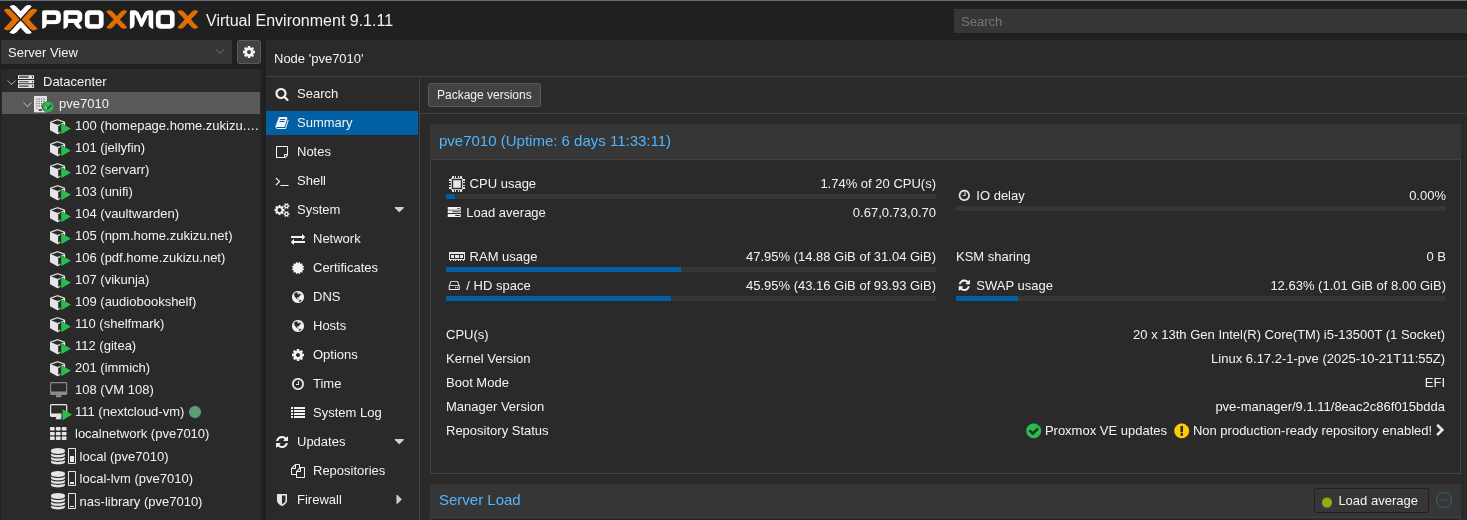
The Dell OptiPlex Micro 7010 runs Proxmox VE. It’s small enough to forget it’s there, but the i5-13500T gives it enough headroom to run everything comfortably.
Most services run as LXC containers: lightweight, fast to spin up, and easy to manage. LXC shares the host kernel, so there’s no virtualisation overhead for services that don’t need it. The media automation stack (*arr services) runs as Docker containers inside a dedicated LXC, keeping the container ecosystem self-contained and portable.
This split works well in practice. LXC for long-running services that need to feel like real machines, Docker Compose for the media stack where the services are tightly coupled and benefit from being managed together.
Storage: TrueNAS
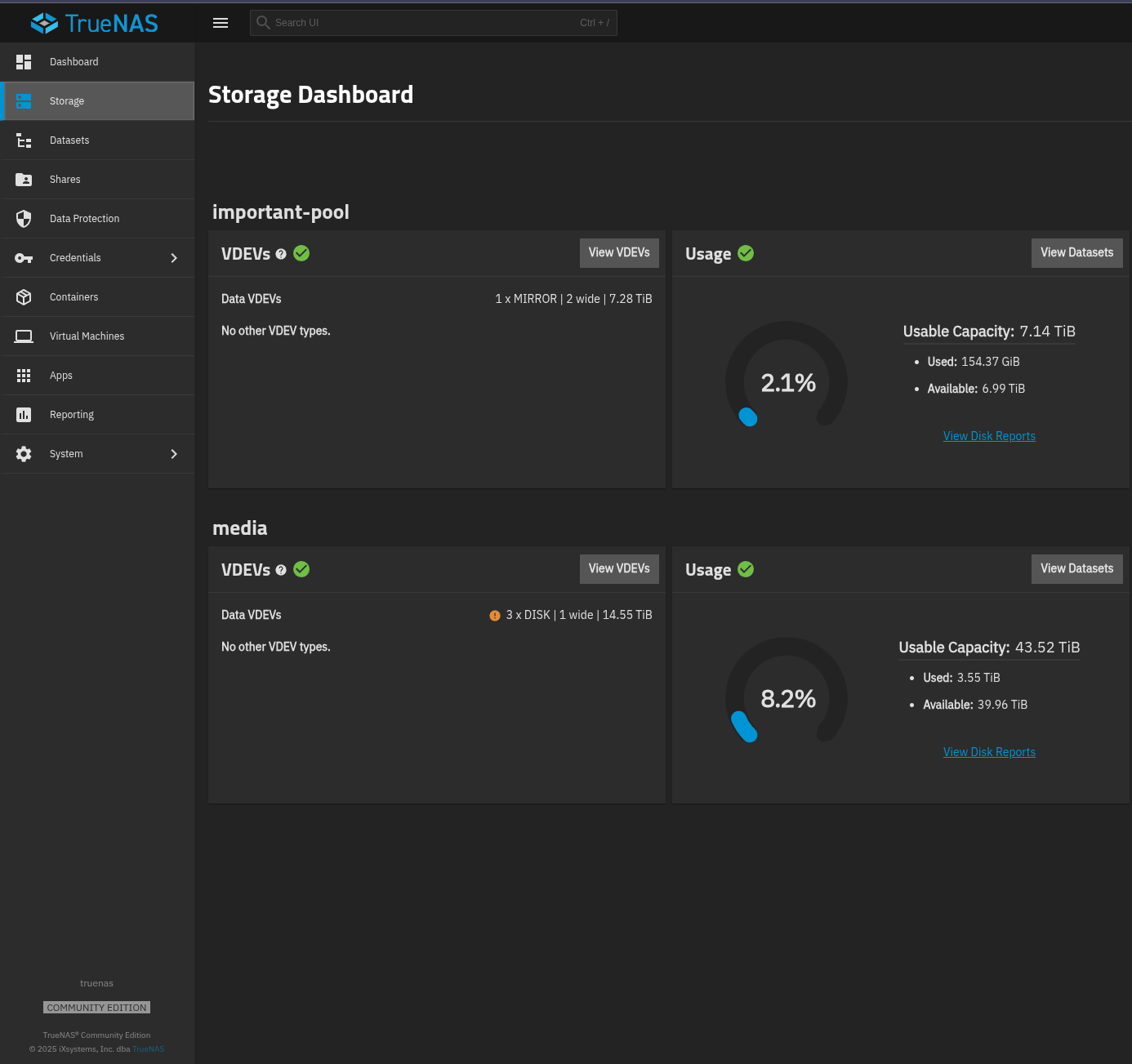
The NAS is an older i5-4670K tower repurposed purely for storage. It doesn’t need to be fast. A NAS spends most of its time waiting on disk I/O, not running computations.
Storage layout:
- 45 TB RAID array for bulk media and long-term storage
- 2x7 TB mirrored pool for higher-value data with redundancy on both drives
TrueNAS handles SMB/NFS shares, exposed only to VLAN 20. Shares are never mounted directly on client machines. All access goes through services on the homelab VLAN.
Media Stack
Jellyfin is the media server. Jellyseerr sits in front of it as the request interface: browse, request, and it automatically hands off to the right *arr app. The *arr stack handles everything before a file lands in the library.
The flow: Jellyseerr → Radarr or Sonarr picks up the request → Prowlarr finds the source → qBittorrent downloads it → renamed and moved into the library → Jellyfin picks it up automatically. Bazarr runs alongside and handles subtitles.
| Service | Purpose |
|---|---|
| Jellyfin | Open-source media server for streaming movies and TV shows |
| Jellyseerr | Media request and discovery interface for Jellyfin |
| Radarr | Movie library management and automated downloads |
| Sonarr | TV show library management and automated downloads |
| Prowlarr | Centralised indexer manager, connects all *arr apps to sources |
| qBittorrent | Torrent download client |
| Bazarr | Automatic subtitle downloads and sync for movies and shows |
Other Services
Beyond the media stack, a collection of self-hosted tools covering productivity, file management, security, and utilities, all running as LXC containers on Proxmox.
| Service | What it does |
|---|---|
| Immich | Photo and video backup, self-hosted Google Photos alternative |
| Nextcloud | Self-hosted cloud storage and file sync, self-hosted Google Drive |
| Bitwarden | Self-hosted password manager (Vaultwarden) |
| Gitea | Lightweight self-hosted Git service, private GitHub |
| Audiobookshelf | Audiobook and podcast server with progress sync across devices |
| Vikunja | Task and project management, self-hosted Todoist alternative |
| Shelfmark | Bookmark manager and read-later tool |
| Nginx Proxy Manager | Reverse proxy with a web UI, handles routing and SSL for all services |
| Portainer | Docker container management web UI |
| PDF Editor | Self-hosted PDF tools: merge, split, convert, and edit |
| Homepage | Customisable dashboard aggregating all services, status, and stats |
Everything is surfaced through Homepage, which gives a single pane of glass across all running services with live status indicators and stats.